





Bebird EarSight Plus Smart Visual Ear Cleaner Kit
At a glance
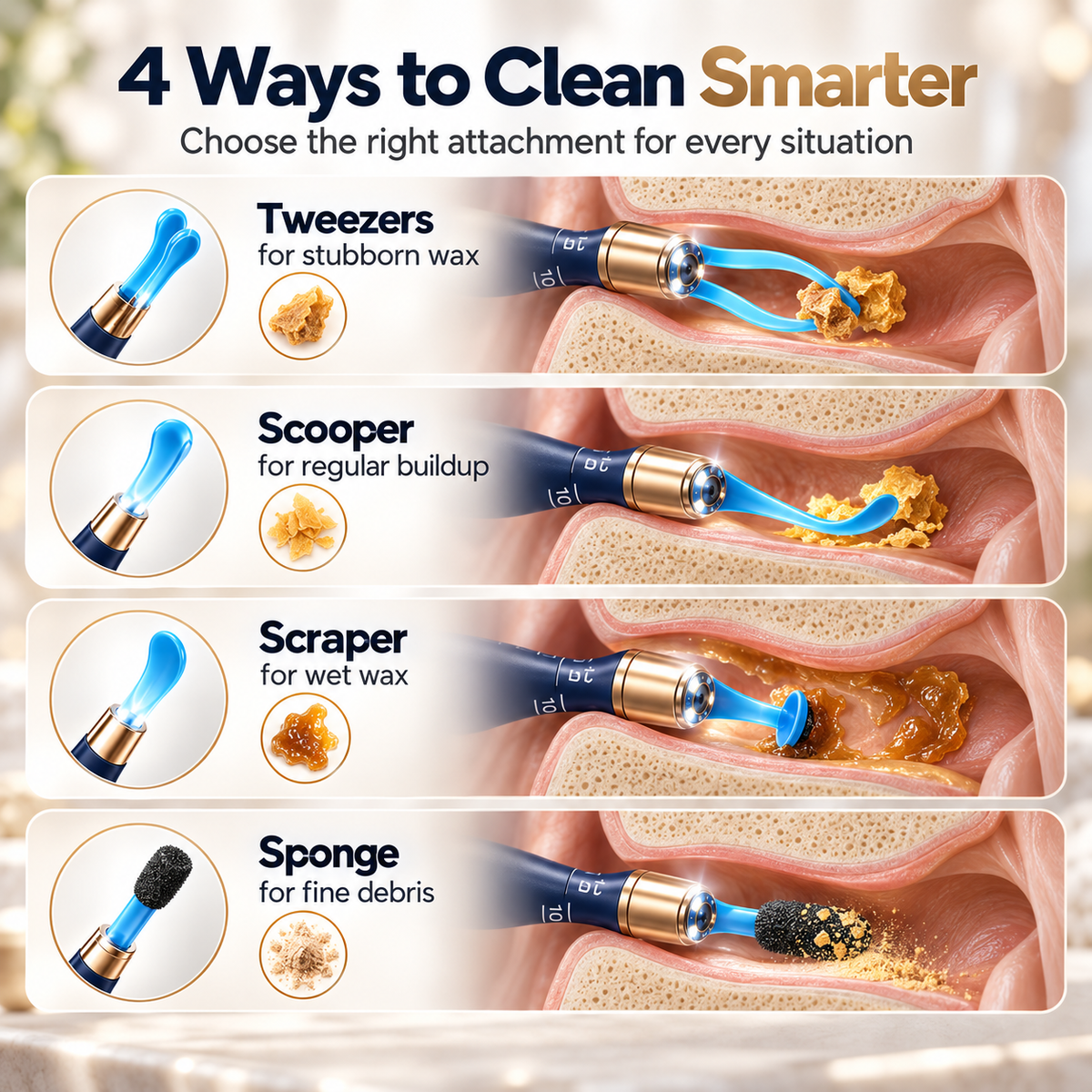
- Real-time viewing through your smartphone; built-in LED lighting; flexible camera tube for angle adjustment; interchangeable ear spoons, sponge tips, and tweezers; additional ear, nasal, and oral observation attachments; rechargeable operation; organized storage in a portable case.
Delivery options and shipping costs are shown at checkout.
How to use
Specifications
Description
Bebird EarSight Plus Smart Visual Ear Cleaner Kit
Overview:
See what you’re doing with the Bebird EarSight Plus. This rechargeable ear-cleaning kit connects to your smartphone to display a live view of the ear canal. A flexible camera tube, interchangeable cleaning tips, and tweezers provide different options for earwax removal, while the storage case keeps the device and accessories organized.
Key benefits:
Real-Time Visual Guidance
View the ear canal live through the Bebird app. The camera and built-in LED lighting help you see the area you are working on.
Flexible Design and Interchangeable Tools
The bendable camera tube allows angle adjustments within its designated bending direction. Switch between ear spoons, sponge tips, and tweezers to suit different cleaning tasks.
Organized, Multipurpose Kit
Keep the device and cleaning accessories together in the portable storage case. Included ear, nasal, and oral observation attachments extend the kit’s viewing functions.
How to use:
-
Download the Bebird app from your phone’s app store or scan the QR code in the instruction manual.
-
Charge the device using the supplied charging cable.
-
Securely install the required attachment. Turn ear-spoon attachments counterclockwise to remove them and clockwise to tighten them.
-
Position the ear canal protective plug on the flexible tube as instructed to help limit insertion depth.
-
Press and hold the power button to switch on the device.
-
Open the Bebird app and select “Connect the device.”
-
Open your phone’s Wi-Fi settings and connect to the network beginning with “bebird-xx-xxxxxx.”
-
Return to the app and select “Begin to clean ears.”
-
If adjustment is necessary, face the marked scale toward you and gently bend the tube left or right only. Do not force it or bend it in other directions.
-
Straighten the tube before installing the tweezers or observation attachments. For the tweezers, attach component A first, then install and tighten component B. Gently pinch the handle to close the tips.
-
Securely attach observation accessories before use. Insert slowly and stop immediately if discomfort occurs.
-
Clean the camera lens after use with the lens brush. Do not submerge the device in liquid.
Children must not use the device without adult supervision.
Specifications:
Product type:
Smart visual ear cleaner kit
Function:
Live ear-canal viewing and earwax removal using interchangeable cleaning attachments; ear, nasal, and oral observation using the corresponding accessories.
Dimensions:
Weight:
Material:
Plastic; accessories include silicone-coated metal, plastic, and sponge components.
Colors:
Dark Blue, White
Power/charging:
Built-in rechargeable battery
USB-C charging
Battery capacity: 230 mAh
Charging time: approximately 50 minutes
Usage time: up to 80 minutes
Input: 5V ⎓ 0.5A
Package includes:
-
Smart visual ear cleaner
-
Accessory storage case
-
Accessory tray
-
Nasal speculum
-
Ear canal speculum
-
Tongue depressor
-
Silicone-wrapped metal ear spoon
-
Double-color Q-elastic ear spoon
-
Double-color annular ear spoon
-
Sponge ear spoons
-
Plastic ear spoons
-
Tweezers component A
-
Tweezers component B
-
Ear canal protective plug
-
Lens brush
-
Charging cable
-
Instruction manual
Other confirmed specifications:
Brand: Bebird
Product series: EarSight Plus
Camera resolution: 10 MP
Lighting: 6 LEDs
Image sensor: CMOS
Image frame rate: 20 fps
Optimum focal length: 12.5 mm
Lens: 3P slim lens
Lens protection rating: IP67
Image orientation: gimbaled intelligent gyroscope
Wireless frequency: 2.4 GHz
Network standard: IEEE 802.11b/g
App: Bebird
Phone compatibility: iOS and Android
Operating temperature: -10°C to 50°C
Couldn't load pickup availability

Bebird EarSight Plus Smart Visual Ear Cleaner Kit